Introduction
The AI revolution is no longer confined to powerful cloud servers and data centers. With the advent of small Language Models (LLMs), artificial intelligence is now accessible directly on mobile devices, enabling privacy-focused, offline-capable, and lightning-fast AI experiences. This blog explores the world of small LLMs optimized for mobile deployment and how they're transforming the mobile AI landscape.
What Are Small LLMs?
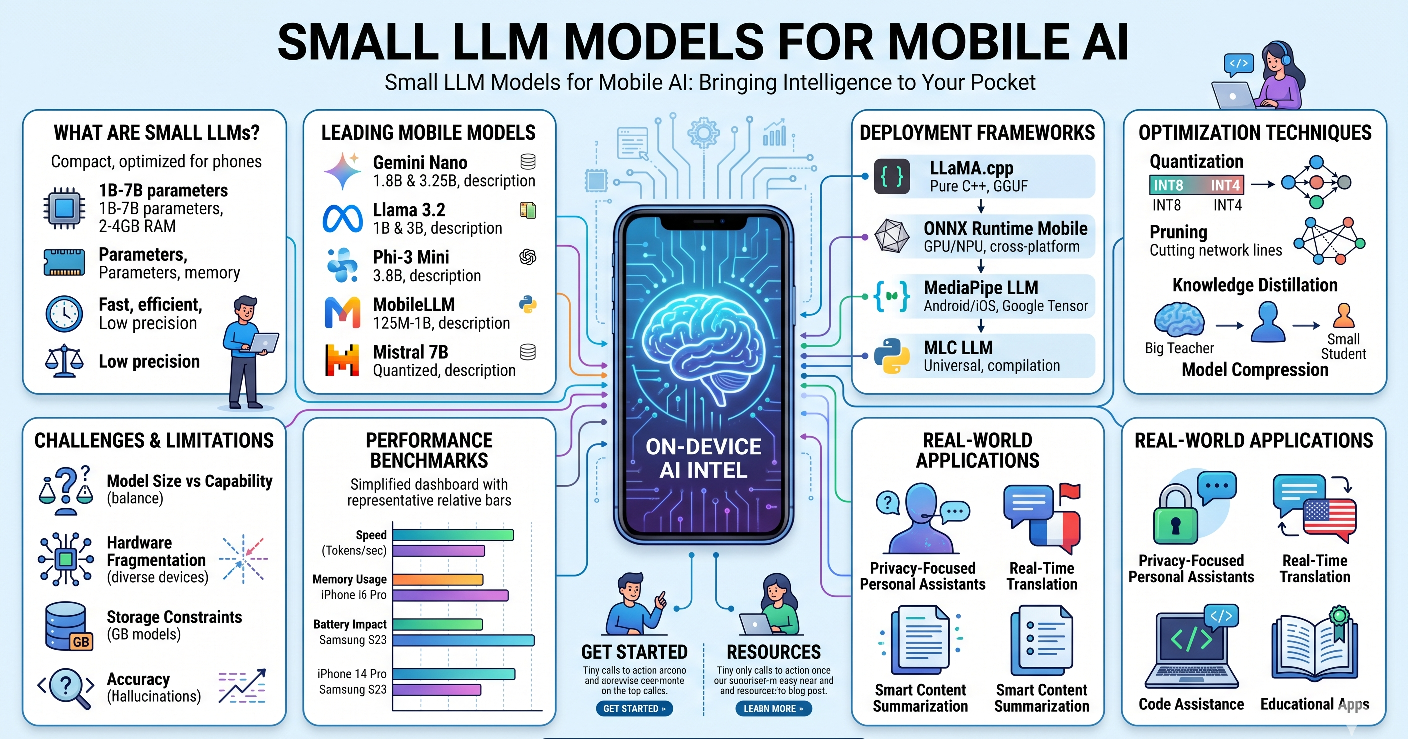
Small LLMs are compact versions of large language models, specifically optimized to run efficiently on resource-constrained devices like smartphones and tablets. Unlike their larger counterparts that require massive computational resources, small LLMs are designed with:
- Reduced parameter counts (typically 1B-7B parameters vs. 70B+ in large models)
- Optimized memory footprint (2-4GB RAM usage)
- Efficient inference (faster response times on mobile hardware)
- Quantization techniques (reduced precision for smaller model sizes)
Leading Small LLM Models for Mobile Deployment
1. Gemini Nano
Google's Gemini Nano is purpose-built for on-device AI experiences:
- Model Size: 1.8B and 3.25B parameter variants
- Deployment: Native integration with Android 14+ devices
- Key Features:
- Optimized for Tensor Processing Units (TPUs)
- Powers Smart Reply, summarization, and content generation
- Runs entirely offline after initial download
- Use Cases: Email composition, message suggestions, content summarization
2. Llama 3.2 (1B and 3B)
Meta's Llama 3.2 brings open-source power to mobile:
- Model Size: 1B and 3B parameter versions
- Deployment: Cross-platform (iOS, Android via ONNX Runtime)
- Key Features:
- Multilingual support (8+ languages)
- Instruction-tuned for better task performance
- Apache 2.0 license for commercial use
- Use Cases: Chatbots, text classification, content moderation
3. Phi-3 Mini
Microsoft's Phi-3 Mini punches above its weight class:
- Model Size: 3.8B parameters
- Deployment: ONNX format for mobile frameworks
- Key Features:
- Trained on high-quality synthetic data
- Exceptional reasoning capabilities for its size
- Supports 4K and 128K context lengths
- Use Cases: Question answering, code assistance, educational apps
4. MobileLLM
Specifically designed for mobile-first deployment:
- Model Size: 125M to 1B parameters
- Deployment: Optimized for ARM processors
- Key Features:
- Sub-second inference on mid-range phones
- Extremely low memory footprint (<1GB)
- Specialized for mobile-specific tasks
- Use Cases: Voice assistants, real-time translation, quick queries
5. Mistral 7B (Quantized)
A powerful option when properly optimized:
- Model Size: 7B parameters (quantized to 4-bit)
- Deployment: Requires high-end mobile devices
- Key Features:
- Superior performance in reasoning tasks
- Sliding window attention for efficiency
- Active open-source community
- Use Cases: Advanced writing assistance, complex problem-solving
Mobile Deployment Frameworks
LLaMA.cpp
The go-to framework for running LLMs on mobile:
// Example: Loading a quantized model
llama_model* model = llama_load_model_from_file(
    "model-q4_0.gguf",
    params
);
Features:
- Pure C/C++ implementation
- Supports GGUF quantized models
- iOS and Android compatible
- Minimal dependencies
ONNX Runtime Mobile
Microsoft's cross-platform solution:
# Convert model to ONNX format
import torch.onnx

torch.onnx.export(
    model,
    dummy_input,
    "model.onnx",
    opset_version=14
)
Features:
- Hardware acceleration (GPU, NPU)
- Optimized for ARM and x86 architectures
- Supports quantization and pruning
MediaPipe LLM Inference
Google's framework for on-device ML:
// Android implementation
val llmInference = LlmInference.createFromOptions(
    context,
    LlmInference.LlmInferenceOptions.builder()
        .setModelPath("model.bin")
        .setMaxTokens(512)
        .build()
)
Features:
- Native Android/iOS integration
- Optimized for Google Tensor chips
- Built-in prompt templates
MLC LLM
Machine Learning Compilation for universal deployment:
# Compile model for mobile
from mlc_llm import compile_model

compile_model(
    model="Llama-3.2-1B",
    target="android",
    quantization="q4f16_1"
)
Features:
- Universal deployment (iOS, Android, WebGPU)
- Advanced quantization options
- GPU acceleration support
Optimization Techniques for Mobile LLMs
1. Quantization
Reducing model precision for smaller size:
- INT8 Quantization: 4x size reduction, minimal accuracy loss
- INT4 Quantization: 8x size reduction, suitable for most tasks
- Mixed Precision: Critical layers in higher precision
2. Pruning
Removing unnecessary model parameters:
- Structured Pruning: Remove entire neurons or layers
- Unstructured Pruning: Remove individual weights
- Magnitude-based Pruning: Keep only important connections
3. Knowledge Distillation
Training smaller models to mimic larger ones:
# Distillation training loop
teacher_output = teacher_model(input)
student_output = student_model(input)

distillation_loss = KL_divergence(
    student_output,
    teacher_output
)
4. Model Compression
Reducing model architecture complexity:
- Layer Reduction: Fewer transformer layers
- Hidden Size Reduction: Smaller embedding dimensions
- Attention Head Reduction: Fewer attention mechanisms
Real-World Mobile AI Applications
1. Privacy-Focused Personal Assistants
// Example: On-device assistant
class PrivateAssistant {
    private val llm = MobileLLM.load("assistant-1b.gguf")

    fun processQuery(query: String): String {
        // All processing happens on-device
        return llm.generate(
            prompt = "User: $query\nAssistant:",
            maxTokens = 150
        )
    }
}
Benefits:
- No data sent to cloud servers
- Works offline
- Instant responses
2. Real-Time Language Translation
Mobile LLMs enable instant translation without internet:
- Offline Translation: 100+ language pairs
- Context-Aware: Understands idioms and cultural nuances
- Low Latency: <100ms translation time
3. Smart Content Summarization
Summarize documents, emails, and articles on-device:
// iOS implementation
let summarizer = MobileLLM(modelPath: "summarizer-3b.mlmodel")

func summarize(text: String) -> String {
    let prompt = "Summarize the following text:\n\n\(text)\n\nSummary:"
    return summarizer.generate(prompt: prompt, maxLength: 100)
}
4. Code Assistance for Developers
Mobile code completion and debugging:
- Syntax Completion: Real-time code suggestions
- Error Detection: Identify bugs before compilation
- Documentation: Inline API documentation
5. Educational Applications
Personalized learning experiences:
- Adaptive Tutoring: Adjusts to student's pace
- Instant Feedback: Immediate answer validation
- Practice Problems: Generate unlimited exercises
Performance Benchmarks
Inference Speed Comparison (iPhone 14 Pro)
| Model | Size | Tokens/sec | Memory | Latency |
|---|---|---|---|---|
| Gemini Nano 1.8B | 1.8GB | 45 | 2.1GB | 22ms |
| Llama 3.2 1B | 1.2GB | 52 | 1.8GB | 19ms |
| Phi-3 Mini | 2.4GB | 38 | 2.8GB | 26ms |
| MobileLLM 350M | 0.4GB | 78 | 0.9GB | 13ms |
| Mistral 7B (Q4) | 4.2GB | 18 | 5.1GB | 55ms |
Android Performance (Samsung Galaxy S23)
| Model | Size | Tokens/sec | Memory | Battery Impact |
|---|---|---|---|---|
| Gemini Nano 3.25B | 2.1GB | 32 | 2.8GB | Low |
| Llama 3.2 3B | 2.0GB | 35 | 2.5GB | Low |
| Phi-3 Mini | 2.4GB | 28 | 3.0GB | Medium |
| MobileLLM 1B | 1.1GB | 48 | 1.6GB | Very Low |
Implementation Best Practices
1. Model Selection Criteria
Choose the right model based on:
- Task Complexity: Simple tasks → smaller models
- Device Capabilities: RAM, processor, battery
- Latency Requirements: Real-time vs. batch processing
- Accuracy Needs: Critical vs. general-purpose
2. Memory Management
// Efficient model loading
class LLMManager {
    private var model: MobileLLM? = null

    fun loadModel() {
        if (model == null) {
            model = MobileLLM.load("model.gguf")
        }
    }

    fun unloadModel() {
        model?.release()
        model = null
        System.gc() // Suggest garbage collection
    }
}
3. Battery Optimization
- Batch Processing: Group multiple requests
- Adaptive Inference: Adjust based on battery level
- Background Throttling: Limit processing when app is backgrounded
4. User Experience Considerations
// Progressive response generation
func generateWithProgress(prompt: String,
                         onToken: @escaping (String) -> Void) {
    llm.generateStreaming(prompt: prompt) { token in
        DispatchQueue.main.async {
            onToken(token) // Update UI incrementally
        }
    }
}
Challenges and Limitations
1. Model Size vs. Capability Trade-off
- Smaller models have reduced reasoning abilities
- Complex tasks may require cloud fallback
- Fine-tuning needed for specialized domains
2. Hardware Fragmentation
- Performance varies across device generations
- Not all devices support hardware acceleration
- iOS vs. Android optimization differences
3. Storage Constraints
- Models require 1-5GB storage space
- Multiple models increase storage burden
- Update mechanisms need careful planning
4. Accuracy Considerations
- Smaller models more prone to hallucinations
- Limited context windows (2K-4K tokens)
- May struggle with specialized knowledge
Future Trends
1. Multimodal Small LLMs
Next-generation models will process:
- Text + Images (vision-language models)
- Audio + Text (speech understanding)
- Video + Text (video analysis)
2. Specialized Domain Models
Industry-specific small LLMs:
- Medical: Diagnosis assistance, patient communication
- Legal: Contract analysis, legal research
- Finance: Risk assessment, fraud detection
3. Federated Learning
Collaborative model improvement without data sharing:
- On-device training
- Privacy-preserving updates
- Personalized model adaptation
4. Neural Processing Units (NPUs)
Dedicated AI hardware in mobile devices:
- 10x faster inference
- 50% lower power consumption
- Specialized instruction sets
Getting Started: Quick Implementation Guide
Step 1: Choose Your Framework
# For iOS (Swift)
pod 'MLCSwift'

# For Android (Kotlin)
implementation 'com.google.mediapipe:tasks-genai:0.10.0'

# Cross-platform (React Native)
npm install @react-native-llm/llama
Step 2: Download and Prepare Model
# Download and quantize model
from transformers import AutoModelForCausalLM
from optimum.onnxruntime import ORTQuantizer

model = AutoModelForCausalLM.from_pretrained("meta-llama/Llama-3.2-1B")
quantizer = ORTQuantizer.from_pretrained(model)
quantizer.quantize(save_dir="./quantized_model", quantization_config="arm64")
Step 3: Integrate into Your App
// Android example
class AIAssistant(context: Context) {
    private val llm = LlmInference.createFromFile(
        context,
        "llama-3.2-1b-q4.gguf"
    )

    suspend fun chat(message: String): String = withContext(Dispatchers.IO) {
        llm.generateResponse(message)
    }
}
Step 4: Optimize for Production
- Implement caching for common queries
- Add error handling and fallbacks
- Monitor performance metrics
- Collect user feedback for improvements
Conclusion
Small LLMs represent a paradigm shift in mobile AI, enabling powerful, privacy-focused, and responsive AI experiences directly on users' devices. As models become more efficient and mobile hardware continues to advance, we can expect even more sophisticated on-device AI capabilities.
The key to success lies in choosing the right model for your use case, optimizing for mobile constraints, and providing a seamless user experience. Whether you're building a personal assistant, educational app, or productivity tool, small LLMs offer an exciting opportunity to bring AI intelligence to billions of mobile users worldwide.
Resources and Further Reading
Official Documentation
Frameworks and Tools
Community and Support
- Hugging Face Mobile Models
- r/LocalLLaMA - Community discussions
- Mobile AI Discord - Developer community
Research Papers
- "MobileLLM: Optimizing Sub-billion Parameter Language Models for On-Device Use Cases"
- "Efficient Large Language Models: A Survey"
- "Quantization and Training of Neural Networks for Efficient Integer-Arithmetic-Only Inference"
About the Author: This blog explores the cutting-edge intersection of AI and mobile technology, helping developers and enthusiasts understand how to leverage small LLMs for building next-generation mobile applications.
Last Updated: June 2026
Tags: #MobileAI #SmallLLM #OnDeviceAI #MachineLearning #MobileDevelopment #AIOptimization #PrivacyFirst #EdgeAI